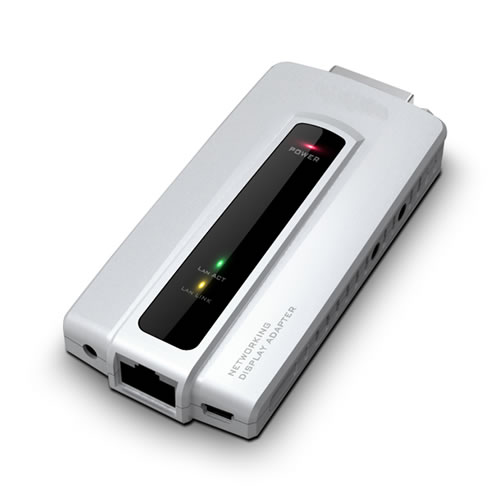
You've got the laptop on one side of the room and the projector on the other, and you're sick of dragging a snake of cables across the floor before every presentation. Or you need to flip between four screens without walking back to each PC every time. This Winstar adapter handles both over your existing LAN cable — up to 100 metres, no new wiring, no signal drop.
Plug in via RJ45 or USB 2.0. Pick one; it does not support both at the same time. On the far end you get a DVI output (VGA and HDMI are optional add-ons) plus two USB 2.0 ports, so the remote station takes a keyboard and mouse like any desktop. Need to jump between four machines? Press the button on the adapter. Sorted.
Display modes: primary, extended, mirror, or rotated at 0°, 90°, 180°, 270°. Max resolution 1280×1024 or 1400×1050. Runs on Windows 2000 through Win7 and Mac. Powered at 5V.
One connection at a time. USB or Ethernet — not both simultaneously. Read that before you wire it up
| brand | Winstar |
| category | Technology |
| subcategory | Networking |
| max_resolution | 1280x1024 / 1400x1050 |
| input_options | Ethernet RJ45 or USB 2.0 (one at a time) |
| video_output | DVI (VGA and HDMI optional) |
| usb_ports_remote | 2 x USB 2.0 |
| remote_pc_control | Up to 4 PCs via switch button |
| display_modes | Primary, Extended, Mirror, Rotation 0/90/180/270 degrees |
| power_requirement | 5 V |
| operating_systems | Windows 2000 / XP / Vista / Win7, Mac |
| max_cable_length | 100 m (LAN cable) |
| connection_rule | USB or Ethernet — not both simultaneously |